Send a campaign again
Fix and resend a failed campaign with Revise, or copy any campaign with Duplicate.
There are two ways to send a campaign again, and which one you use depends on its status:
- Failed: click Revise to turn it back into a draft, fix the problem and send it.
- Sent or Canceled: click Duplicate to make a new draft copy. Neither can go out a second time.
You can duplicate any campaign, whatever its status, if you’d rather keep the original as it is.
Fix and resend a failed campaign
When a campaign fails, nothing is sent and we email you (Your campaign “…” couldn’t be sent). Its page says why.
- Open the campaign. The red banner gives the reason. For a template error, open Details to see the exact problem.
- Click Revise. The campaign is a draft again, and you land on the Review step with what to fix under What’s left.
- Fix it, then send or schedule it again.
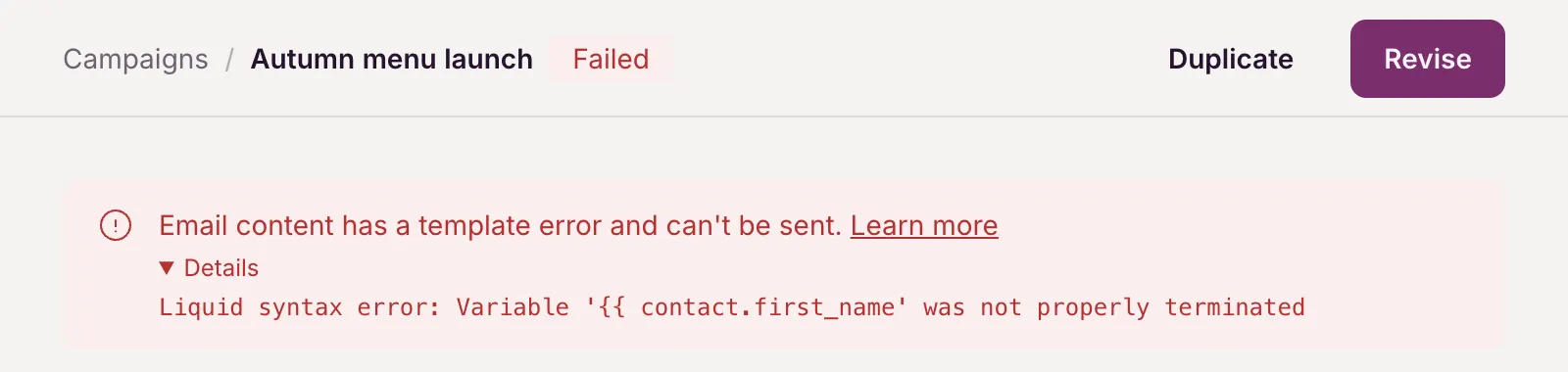
What the reason means:
- “A link in your email couldn’t be read”: check your links for typos or stray characters.
- “Email content has a template error and can’t be sent”: a merge tag is broken, often missing its closing
}}. See Merge tags: personalise with contact data. - “Campaign resolved to zero recipients”: by the time it sent, nobody in your audience could receive it. Check the audience on Setup.
- “Every send for this campaign failed, so nobody received it”: check your domain under Settings → Sending domains before you try again, and email us if it happens twice.
- “This campaign was blocked after a content review”: see My campaign is “in review”.
- “We couldn’t prepare this campaign”: something went wrong on our side. Revise and send it again, and if it fails again, email contact@emailfig.com.
“A link in your email points to a domain we block, so sending is paused on your account.” This also suspends your account, so Revise won’t get it out. See My account was suspended, and email contact@emailfig.com if you think it’s a mistake.
Duplicate a campaign
- Click Duplicate at the top of the campaign’s page, or open the … menu on its row in the Campaigns list and choose Duplicate.
- You land on the copy’s Setup step, named like “October news (copy)”.
The copy keeps the subject, preview text, sender, content and audience. It starts as a Draft with no send time and no report, and the original stays as it was.
If the original already reached some people, the copy goes to everyone in the audience again, so narrow it first if that matters.