AWS connection health errors
What each message on Settings → AWS means, and which button fixes it.
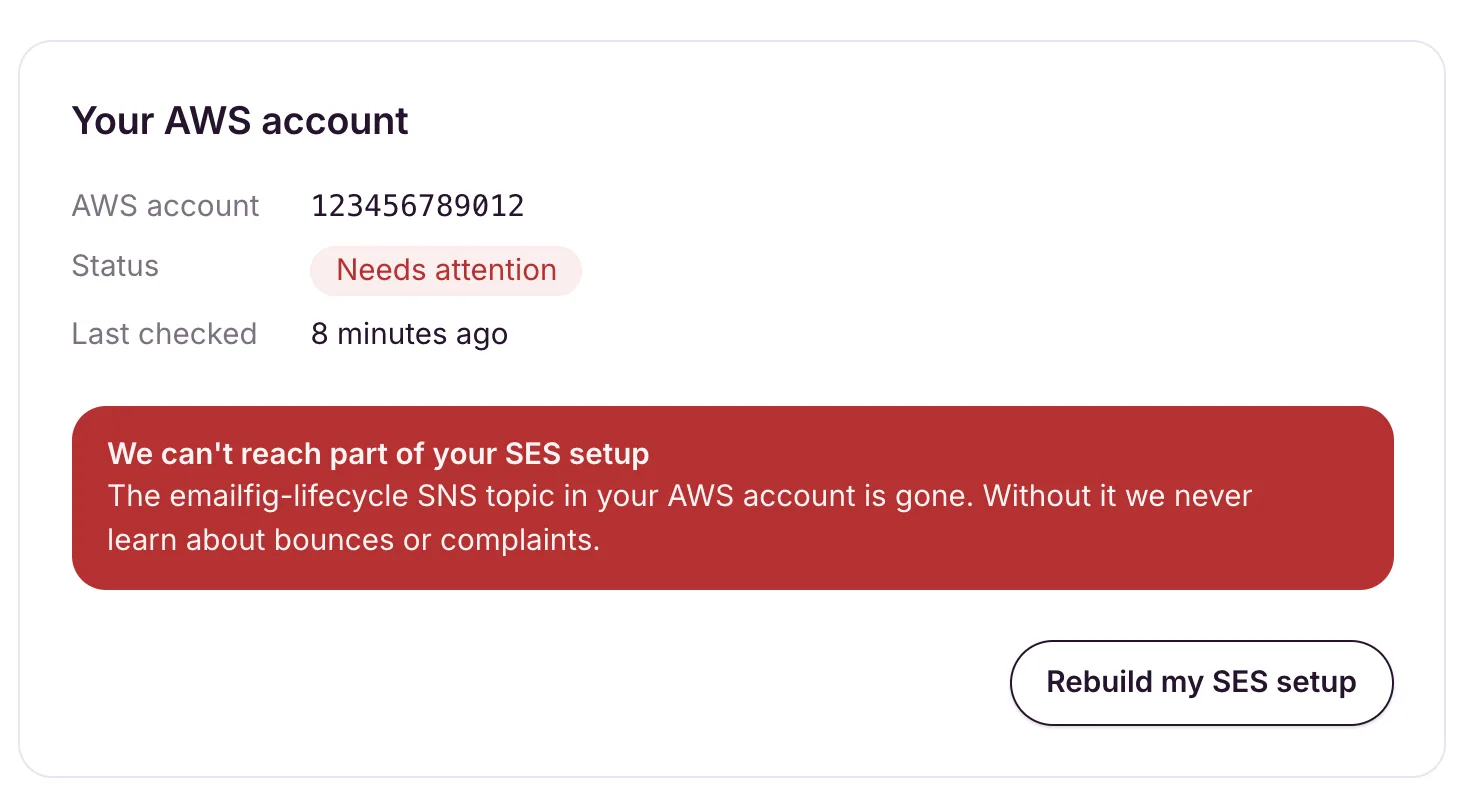
If part of your AWS connection stops working, Settings → AWS shows the status Needs attention, an alert with the reason, and one button to fix it. Sending is paused until it’s fixed, and we email you once, with the subject Action needed: your AWS connection is broken.
Some of the same messages can also appear while you’re first connecting.
The messages
| The message says | What to do |
|---|---|
| “We can’t assume the EmailfigConnectRole in your AWS account. Check the CloudFormation stack still exists and that its trust policy hasn’t been edited.” | Make sure the emailfig-connect stack still exists in us-east-1 and hasn’t been edited, then click Try again or Check again. |
| “The emailfig-lifecycle SNS topic in your AWS account is gone. Without it we never learn about bounces or complaints.” | Click Rebuild my SES setup. |
| “Our subscription to your emailfig-lifecycle topic has been removed, so your delivery events aren’t reaching us.” | Click Rebuild my SES setup. |
| “Your SES configuration set no longer publishes events to the emailfig-lifecycle topic.” | Click Rebuild my SES setup. |
| “We reached your AWS account but couldn’t finish setting SES up in it. Check the CloudFormation stack completed, then try again.” | Check the stack shows as complete in CloudFormation, then click Try again or Rebuild my SES setup. |
| “AWS has paused sending on your SES account. Open your SES console to see why. We can’t lift it for you.” | See Keep your AWS account in good standing. Once AWS lifts it, click Check again. |
| “That AWS account is already connected to another EmailFig account. Connect a different AWS account, or email contact@emailfig.com to move it to this one.” | Click Connect AWS Account while signed in to a different AWS account. To use this AWS account here instead, email support and we’ll move it for you. |
| “The role we assumed belongs to a different AWS account than the one your stack reported. Contact support and we’ll get you reconnected.” | Click Contact support. |
| “The EmailfigConnectRole in that AWS account lets us in without the External ID we issued, so we won’t use it. Contact support and we’ll get you reconnected.” | Click Contact support. |
| “Your stack reached us but we couldn’t finish connecting it. Nothing is wrong with your AWS setup. Contact support and we’ll sort it out.” | Click Contact support. |
| “We’ve hit a limit on our side while connecting your account. Nothing is wrong with your AWS setup. We’ve been alerted; please contact support.” | Click Contact support. This one is ours to fix. |
Contact support opens an email to contact@emailfig.com. Send it from the address you sign in with and paste the message. A real person will help.
The button
The card shows one button:
- Try again reruns setup, for a connection that hasn’t finished setting up.
- Rebuild my SES setup recreates the missing pieces in your AWS account.
- Check again looks at your AWS account again, once you or AWS have fixed the problem.
- Contact support emails us, for the problems only we can fix.
The alert clears once everything checks out. Last checked on the card shows when EmailFig last looked. If you click too often, you’ll see Please wait a moment before checking again.
Your campaigns in the meantime
- Campaigns that were sending, and live automations, are paused. Each paused campaign shows We paused this send with the reason, and we email you, with the subject We’ve paused your sending. Once the connection is fixed, open each one and click Resume.
- A new send is refused with Can’t send yet: your AWS connection needs attention. See Settings → AWS.
- Settings → Sending domains shows Set up AWS first instead of Add domain.
Your contacts, templates and reports aren’t affected.