Why my automation isn't sending
Check the automation's status first, then whether the person you expected ever entered, then whether they're stuck or still waiting.
Start with the badge next to the automation’s name on the Automations page. Only a live automation sends. If it’s live but one person isn’t getting emails, the reason is usually about them.
It isn’t sending to anyone
It’s a draft. It has never gone live, or it was sent back. Click Go live and work through the checklist. If the page says “This one can’t go live as-is.”, click Edit emails and make the change the note asks for. See Go live, pause, resume or archive.
It’s paused. Click Resume. Nothing sends while it’s paused, and anyone who would have entered in the meantime doesn’t.
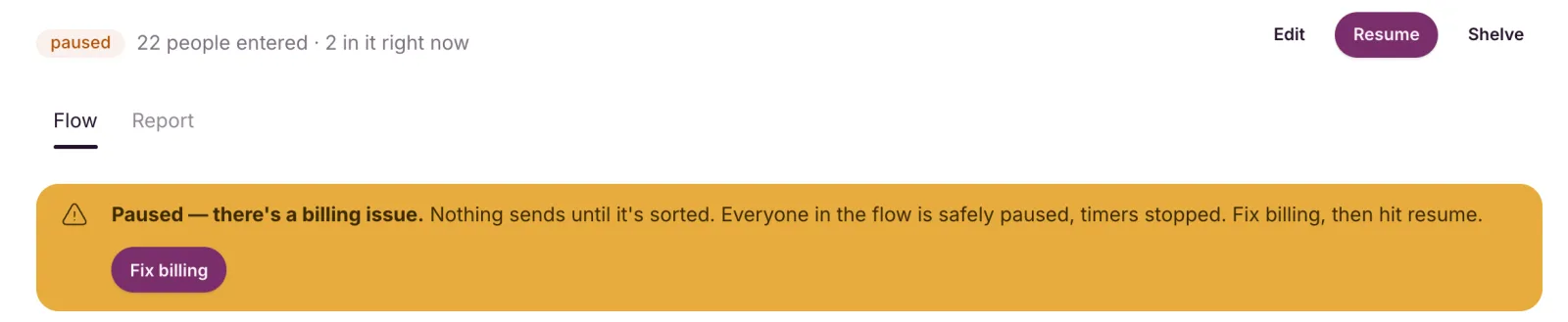
“Paused. There’s a billing issue.” A payment problem paused it. Click Fix billing, sort out the payment, then come back and click Resume. The banner goes away once the payment is sorted. It won’t resume on its own. See Fix a failed payment.
“Your account can’t send right now.” Something on your account is stopping all sending, and the banner says what:
- Open AWS settings: your own Amazon SES connection needs attention. See Connection health errors.
- Fix billing: a payment or plan problem.
- No button: your account is on hold while we review it, and we’ll email you. See Account suspension.
Once it’s fixed, the banner goes away and the automation is simply paused. Click Resume. Everyone in the flow is still where they were.
A campaign in review doesn’t stop your automations, and neither does reaching your monthly email allowance.
It’s archived. Archiving is permanent. To run the same flow again, build a new automation.
The person you expected never entered
- They were imported. Imports never start an automation. Send imported contacts a campaign instead.
- They’ve been through it before. Each contact enters a given automation once, ever.
- It wasn’t live when they joined. People who join while it’s a draft or paused don’t enter later.
- They’re not subscribed. Someone unsubscribed, bounced or marked as spam is skipped.
- They haven’t confirmed yet. On a double opt-in list, they enter when they click to confirm, not when they sign up.
- The trigger points somewhere else. Check the Starts when card names the list, tag or form you expect.
More in Automation triggers and who enters.
They entered, but an email didn’t arrive
- They’re still waiting. On the automation’s page, click “N waiting here · see who” on a step to see who’s there and when each person moves on.
- A split sent them the other way. Each path only sends its own emails.
- They left. Unsubscribing, bouncing, marking an email as spam or being erased takes someone out straight away. In a list or form automation, so does unsubscribing from that list.
- They’re stuck. An “N stuck” badge in the Needs a look column means a step couldn’t run for some people. Click it, fix the step it names, then click Reset stuck people to send them on from where they stopped. See Read an automation report.
Still stuck? Email contact@emailfig.com with the automation’s name and the contact’s email address, and a real person will help.