Branch your flow with a split
A Yes / no split sends each person down one of two paths: by whether they opened or clicked, by segment or by who they are, or as an A/B test.
A Yes / no split sends different people down different paths in the same automation. Add it from the + menu like any other step, then choose what decides the path under What decides who goes where? in the panel on the right.
| Choice | What it checks | The two paths |
|---|---|---|
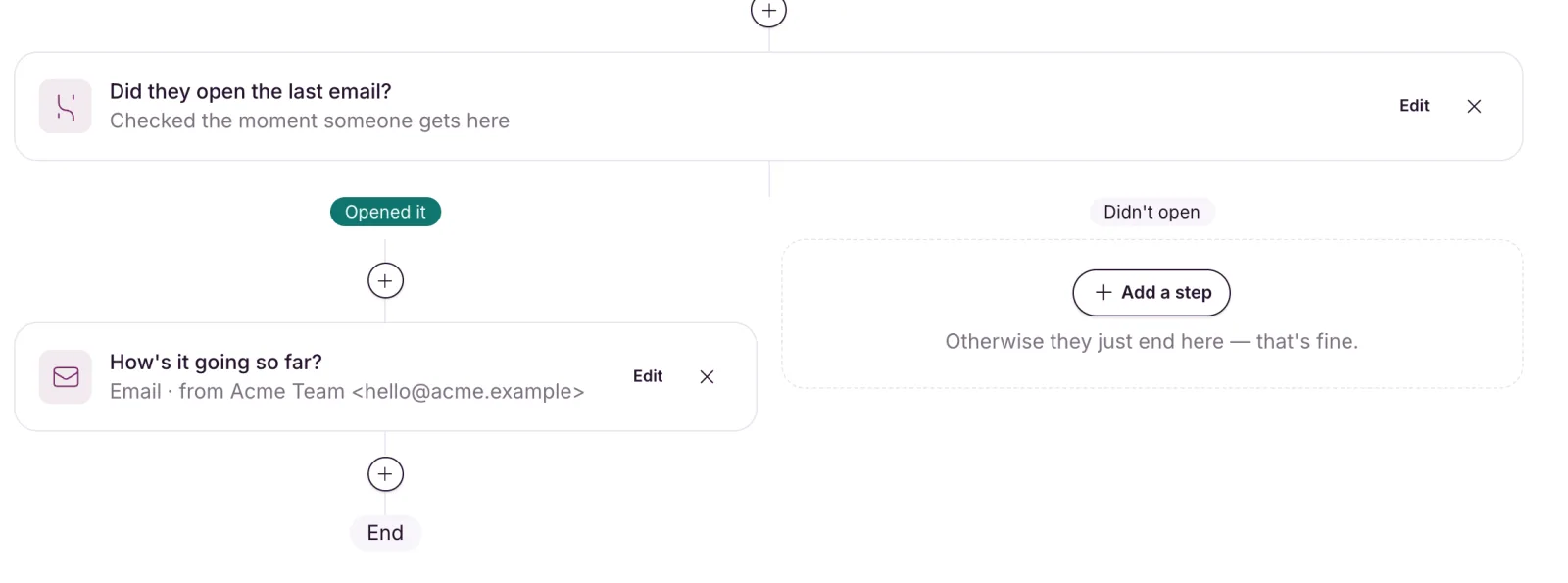
| They opened the last email in this flow | Whether they opened the most recent email before the split | Opened it / Didn’t open |
| They clicked it | Whether they clicked a link in that same email | Clicked / Didn’t click |
| They’re in a segment | Whether they’re in one of your saved segments | In it / Not in it |
| Who they are: lists, tags, status | Rules you set for this split only | Matches / Doesn’t match |
| A/B split | Nothing: it sends a share of people each way | A · 50% / B · 50% (your split) |
Click Save. The two paths under the split take their labels from your choice.
Opened or clicked
Put a Wait between the email and the split so people have time to open it. Without one, everyone takes the “didn’t open” path, so the automation can’t go live until there’s a wait in between.
The split checks the last email on that person’s path, so it needs at least one email above it.
In a segment, or who they are
They’re in a segment uses one of your saved segments. Pick it under Which segment? If you edit the segment later, the split uses the new rules, including for people already part-way through.
Who they are: lists, tags, status gives you the same rule builder as segments, but the rules belong to this split alone.
A/B split
Set How many take path A? to anything from 1% to 99%. Everyone else takes path B, and nobody switches sides. Put a different email on each path, then compare them in the report.
Building the paths
- Each path is its own chain of steps, and the two paths never rejoin.
- A path can be empty. It shows “Nothing else happens on this path.” with an Add a step button.
- Add a split above existing steps and they move onto the first path. The second path starts empty.
- Splits can nest inside each other.
Removing a split
If only one path has steps, removing the split keeps that path and joins it to the main flow.
If both paths have steps, EmailFig asks Remove this split? with a button for each, such as Keep the “Opened it” path. The path you keep joins the main flow and the other path’s steps are removed. Emails that already sent keep their numbers, and anyone on the removed path finishes the flow there.
If a split can’t decide
A split never guesses. If it can’t check someone (say, a rule it relies on no longer works), that person stops at the split and shows as stuck. Fix the split, then use Reset stuck people. See Read an automation report.