Create a welcome series from a recipe
Start an automation from a ready-made recipe, then check its trigger and emails and take it live.
A recipe is a ready-made automation with its trigger, steps and email copy already filled in. You start it as a draft, make it yours, and go live. It’s usually quicker than starting from a blank flow.
- Open Automations and click Start from a recipe. (If you have no automations yet, the recipes show on the page under Or start from a recipe.)
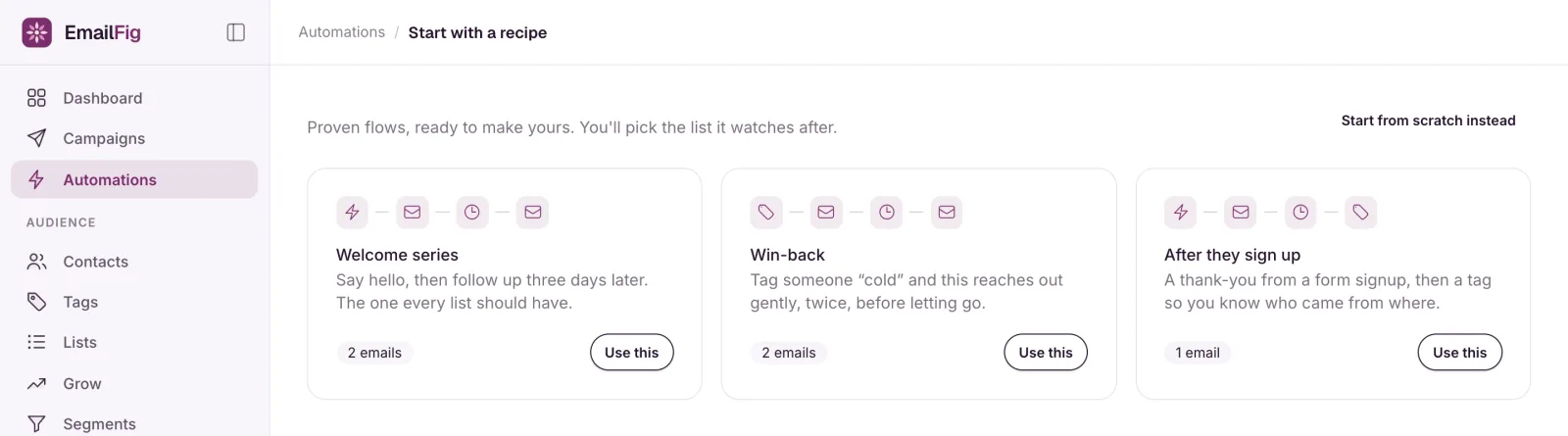
- Pick a recipe and click Use this:
- Welcome series: two emails, three days apart, when someone joins a list.
- Win-back: two gentle emails, five days apart, when someone gets a tag such as “cold”.
- After they sign up: a thank-you email when someone signs up through a form, then a tag a day later so you know where they came from.
- Your draft opens in the builder: “Here’s your draft. Check the trigger and the emails, then take it live.”
- Click the Starts when card. The recipe starts from your first list, tag or form, so check the list, tag or form is right and click Save trigger. You can change the kind of trigger too.
- For After they sign up only: click the Add a tag step, choose a tag under Which tag?, and click Save.
- Click each email to check its Subject, Preview text and From, then click Edit the email to change the wording.
- Click Go live.
To start with an empty flow instead, click Start from scratch instead on the recipes page.
If a recipe needs something first
Each recipe needs a list, tag or form to start from. If you don’t have one yet, its card says so, for example “Needs a tag first”, and shows Create a tag in place of Use this. Create the list or tag and you’re brought back to the recipes, ready to click Use this. For a form, build it first, then come back to Start from a recipe.