Why my email renders differently in Gmail
A style block placed in the body of your HTML stays in the body, and Gmail ignores CSS anywhere but the head.
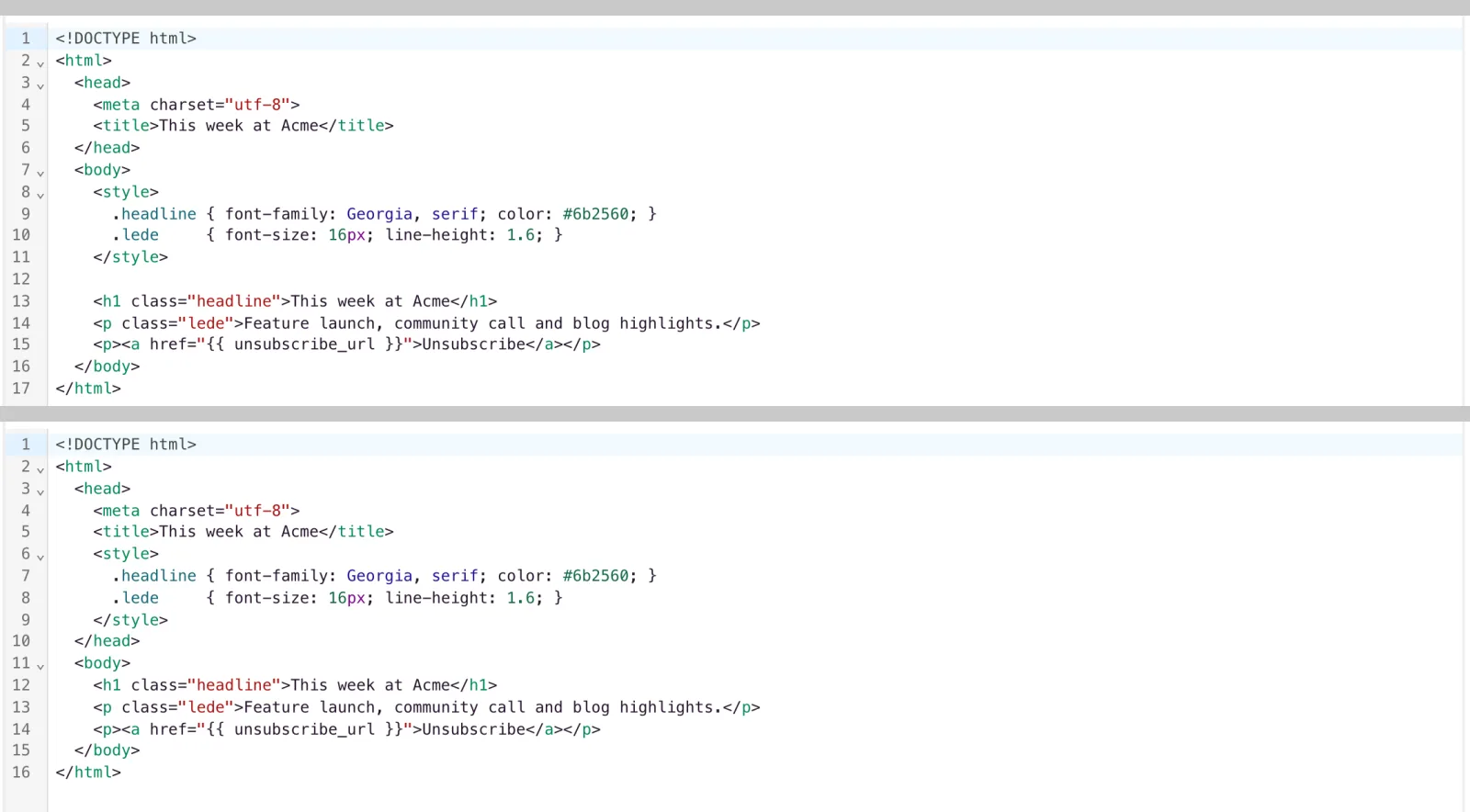
If an email looks right in EmailFig’s preview but wrong in Gmail, the most common cause is a <style> block in the <body> of your HTML instead of the <head>. Gmail only reads CSS from a <style> block in <head>; a block in <body> is ignored, while other clients (and EmailFig’s own preview) show it fine.
EmailFig inlines as much CSS as it can when a campaign sends, but it never moves a misplaced <style> block, so a body-placed one reaches Gmail unsupported.
Fix it
- Open the template in the HTML editor and switch to the source view (the
</>button). - Find the
<style>block. If it’s inside<body>, cut it and paste it inside<head>. - Save, then send yourself a test email and check it in Gmail. EmailFig’s own preview can’t reproduce Gmail’s stricter behaviour.
If your template was built in the drag & drop editor, this doesn’t apply: its output is already fully inline-styled, with no separate <style> block to misplace.